
Amazon Stock Count Chrome Extension – Live Offers, Prices & Stock
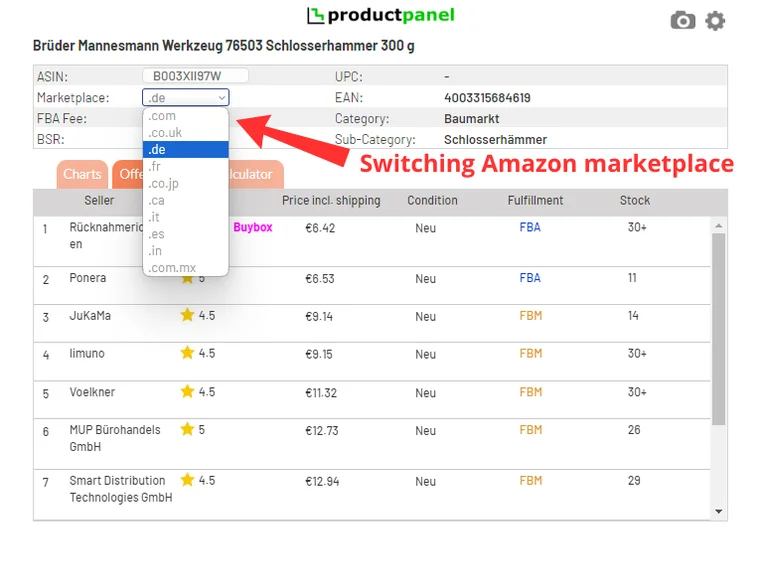
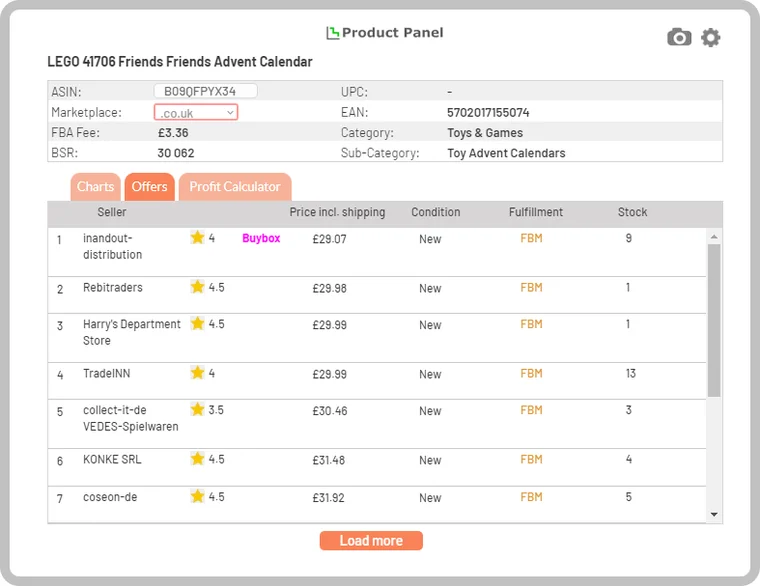
See how many units every seller has in stock on any Amazon listing. ProductPanel’s live offers list shows all offers in one table – seller, rating, price including shipping, condition, FBA or FBM and stock count from 1 to 30+.
What the live offers list shows
Live offers gives Amazon sellers a clean list of every offer on a product, sorted by price including shipping from lowest to highest. Each row contains:
| Column | What it tells you |
|---|---|
| Seller | Seller name, with the current Buy Box winner highlighted. |
| Rating | Seller feedback rating, so you can see who is likely to win the Buy Box. |
| Price incl. shipping | The total price a customer pays. The list is sorted from lowest to highest. |
| Condition | New, used (like new, very good, good, acceptable) or collectible. |
| Fulfillment | FBA (Fulfilled by Amazon) or FBM (fulfilled by the merchant). |
| Stock | How many units the seller has in stock, from 1 to 30+ (more than 30 units). |
How to check an Amazon seller’s stock
- Set your delivery location. In the top-left corner of Amazon, choose a postcode in the marketplace’s country so prices and shipping match what local customers see.
- Open the Offers tab. In the ProductPanel box on the product page, select Offers to load every offer on the listing.
- Read the stock column. Each row shows the seller’s stock count from 1 to 30+.
- Compare other marketplaces. Pick another Amazon domain from the marketplace dropdown to compare offers internationally.
To see the correct prices shown to a customer in the marketplace’s country, the delivery location matters: Amazon calculates shipping and sometimes hides offers based on where the customer is.
Compare offers across 10 Amazon marketplaces
Using the marketplace dropdown you can switch to another Amazon domain – amazon.com, amazon.co.uk, amazon.de, amazon.fr, amazon.it, amazon.es, amazon.ca, amazon.com.mx, amazon.co.jp, amazon.in – and compare offers internationally without leaving the current listing. That makes it easy to spot cross-border arbitrage opportunities, for example buying in Germany and selling in the UK.
How sellers use stock counts
- Predict price jumps. If the Buy Box seller has only 1–2 units left, the lowest price will likely rise once they sell out – that is the price you can expect to sell for.
- Size your order. Large stock (30+) from several FBA sellers means you will share sales for a long time; buy fewer units.
- Check FBA vs FBM competition. FBM offers often have higher total prices and rarely win the Buy Box against FBA offers at the same price.
- Spot Amazon on the listing. Combine live offers with the price history to see when Amazon last sold the product.
Next: check profit before you buy
Once you know the price you can sell for, calculate profit and ROI with real referral and FBA fees in the extension, or plan storage costs with the free FBA storage fee calculator. See the whole process in the online arbitrage case study.
Amazon stock count – FAQ
How can I see how many units a seller has in stock on Amazon?
Open the product page with the ProductPanel extension installed and select the Offers tab. Every offer shows the seller’s stock count from 1 to 30+, alongside price including shipping, rating, condition and FBA/FBM.
What does 30+ mean in the stock column?
The seller has more than 30 units in stock. Exact numbers are shown from 1 to 30.
Why do prices differ from what I see on Amazon?
Amazon shows prices and shipping based on the delivery location. Set the delivery location in the top-left corner of the Amazon page to a postcode in the marketplace’s country to see the prices local customers see.
Can I compare offers across Amazon marketplaces?
Yes. Use the marketplace dropdown in the panel to load offers for the same product on amazon.com, amazon.co.uk, amazon.de, amazon.fr, amazon.it, amazon.es, amazon.ca, amazon.com.mx, amazon.co.jp, amazon.in without leaving the current listing.
Why is stock count useful for Amazon sellers?
Stock counts show how long competitors can hold the Buy Box. If the cheapest seller has 1–2 units left, the lowest price will likely jump once they sell out. Low stock across all sellers can also signal a product that is getting harder to source.